
Best overall for kitchen recipes: the Apple iPad (A16) is a strong choice for its sharp 11-inch-class display, broad recipe-app support, and long battery life—but it is not water-resistant, so a splash-safe stand or wall mount matters. For kitchens where spills are likely, choose a water-resistant tablet such as the Samsung Galaxy Tab Active5 instead.
The best tablet for kitchen recipes depends less on raw speed than on where you’ll put it, how often you cook, and how much mess it must tolerate. Screen readability, a stable hands-free setup, battery endurance, and easy-to-use recipe apps should guide the choice.
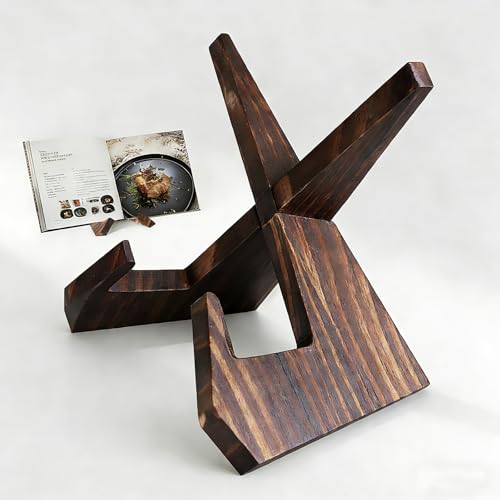
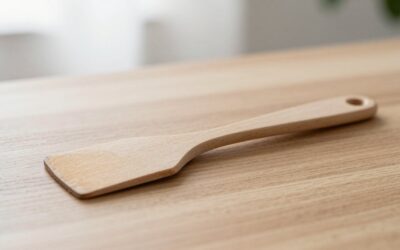
Aloimiki Wooden Cookbook Stand, Foldable Recipe & Tablet Holder
Included for 'Best Tablets for Kitchen Recipes and Hands-Free Cooking' because the listing specifies Foldable Recipe & Tablet Holder, details this guide uses to compare options.
View on Amazon
Kitchen Recipe Display for Fire Tablet Cooking Steps, Timers, Grocery List & Meal Board
Included for 'Best Tablets for Kitchen Recipes and Hands-Free Cooking' because the listing specifies Timers and Grocery List & Meal Board, details this guide uses to compare options.
View on Amazon
Kitchen Recipe Steps for Fire TV & Tablet Big Cooking Instructions, Ingredient Checklist, Multi Timers & Recipe QR
Included for 'Best Tablets for Kitchen Recipes and Hands-Free Cooking' because the listing specifies Ingredient Checklist and Multi Timers & Recipe QR, details this guide uses to compare options.
View on AmazonKitchen tablet comparison
Dimensions and battery figures below are manufacturer specifications where available. Battery life varies with screen brightness, Wi-Fi use, video playback, and age; manufacturer estimates are not a guarantee of kitchen runtime. “Water-resistant” ratings also do not mean a tablet is safe to wash or use with wet hands.
| Tablet | Display | Weight | Water protection | Battery reference | Best fit |
|---|---|---|---|---|---|
| Apple iPad (A16) | 11-inch class, 2360 × 1640 | About 477 g (Wi-Fi) | No IP water-resistance rating | Up to 10 hours of web or video use, per Apple | Everyday cooking and broad app choice |
| Samsung Galaxy Tab S10 FE | 10.9 inches, 2304 × 1440 | About 497 g (Wi-Fi) | IP68-rated tablet and included S Pen | Up to 20 hours of video playback, per Samsung | Android users who want a larger screen and spill resistance |
| Samsung Galaxy Tab Active5 | 8 inches, 1920 × 1200 | About 433 g, before some accessories | IP68-rated; rugged construction | 5,050 mAh battery; runtime depends on use | Compact kitchens or frequent splashes and handling |
| Amazon Fire HD 10 | 10.1 inches, 1920 × 1200 | About 434 g | No water-resistance rating | Up to 13 hours of mixed use, per Amazon | Budget-friendly recipes, reading, and video |
Check the exact model and regional version before buying: specifications and included accessories can vary. The Galaxy Tab S10 FE’s IP68 rating belongs to the tablet, not necessarily its case or charging accessories. The Fire HD 10 uses Amazon’s Fire OS, so app availability and installation can differ from standard Android tablets.
Choose by kitchen and cooking style
| Your situation | Best direction | Why |
|---|---|---|
| You cook several times a week and want the easiest app selection | Apple iPad (A16) | Strong general-purpose performance and a broad selection of recipe, browser, and video apps |
| You cook near a sink or often handle ingredients while following recipes | Galaxy Tab S10 FE or Tab Active5 | IP68 protection offers a useful extra margin against accidental water exposure |
| You want to spend less and mostly read recipes or watch cooking videos | Fire HD 10 | A large screen at a generally lower market price, if its app ecosystem meets your needs |
| Your counter is crowded or you want a permanent wall setup | 8–11-inch tablet with a compatible mount | Smaller devices fit tight spaces; larger displays are easier to read from farther away |
For budget planning, basic tablets commonly fall around $100–$250, mainstream models around $250–$500, and rugged or premium configurations can cost more. These are broad market ranges, not fixed prices; storage, connectivity, sales, and accessories affect the total.
What matters most at the counter
Screen size and readability
A 10- or 11-inch screen is a comfortable middle ground for most recipes: ingredient lists are readable without constant zooming, and split-screen use can keep a browser or timer visible. An 8-inch tablet saves counter space but may require more scrolling. If the tablet will sit across the kitchen, prioritize a bright display and large text over extra resolution. Matte screen protectors can reduce reflections, though they may slightly soften the image.
Water resistance is a safeguard, not permission to get it wet
IP68-rated models provide better protection against dust and accidental water exposure than tablets with no rating. Ratings are based on controlled conditions, and protection can decline as a device ages or is damaged. They do not cover every kind of spill, steam exposure, soap, oil, or food residue. Keep ports dry, avoid using the tablet with wet hands, and follow the manufacturer’s cleaning instructions.
Battery life and charging habits
A tablet rated for roughly 10 hours of web or video use should generally cover several recipe sessions between charges, but a bright screen, streaming video, and weak Wi-Fi can shorten runtime. For a tablet that lives on the counter or wall, check that the mount leaves the charging port accessible and that the cable can be routed away from heat, water, and burner controls. A permanently plugged-in tablet is convenient, but prolonged heat and poor cable routing are avoidable risks.
Recipe apps and hands-free controls
Before choosing an operating system, check that your preferred recipe app is available and supports features you’ll use, such as saved recipes, adjustable serving sizes, step-by-step mode, voice control, or grocery lists. A browser can cover many recipe sites, but sign-in requirements, pop-ups, and cluttered pages may make a dedicated app easier to use. Test voice commands with the device at its intended distance; a running fan or extractor can make speech recognition less reliable.
Countertop stand or wall mount?
A countertop stand is the more flexible option. Look for a wide, non-slip base, a tilt adjustment, and a cradle that grips the tablet without covering buttons or ports. It can move between rooms and is usually easier to clean around, but it occupies valuable workspace and can be knocked over.
A wall mount keeps the counter clear and can make the recipe easy to see from a prep area. Before drilling, check the wall material, tablet dimensions, mount compatibility, charging-cable route, and distance from the stove and sink. Avoid placing a tablet above a burner: heat, steam, and grease are hard on electronics and make the screen harder to keep clean. A mount with a removable cradle is easier to take down for wiping and charging.
Protect the tablet and keep it usable
- Set it outside the splash zone. A protective rating is backup protection, not a substitute for sensible placement.
- Use clean, dry hands or voice controls. Flour, oil, and sticky residue can make a touchscreen frustrating and may get into case seams.
- Clean gently. Follow the device maker’s directions, disconnect cables first, and use a soft cloth. Don’t spray cleaner directly onto the screen or assume disinfectants are safe for its coating.
- Keep the mount clean too. Hinges, rubber pads, and adjustable joints collect crumbs and grease; inspect them periodically and tighten hardware as needed.
- Use a case that fits the mount. Thick cases can prevent a secure grip. Check the fit before mounting the tablet over a work surface.
In regular kitchen use, the first frustrations are often practical rather than dramatic: a loose stand, greasy fingerprints, an awkward charging cable, or a recipe page that goes to sleep mid-step. A stable mount, a screen timeout setting suited to cooking, and a quick wipe after use can matter more than a faster processor.
Bottom line
For most cooks, the Apple iPad (A16) is the best all-around choice when app selection and readability come first and the tablet can be kept away from splashes. Choose the Galaxy Tab S10 FE for a large Android screen with water resistance, or the smaller Galaxy Tab Active5 when durability and compact placement matter most. The Fire HD 10 is a sensible lower-cost option if its app selection suits your routine. Whichever you choose, budget for a secure stand or compatible mount—the hands-free setup is what makes a tablet practical while cooking.
Write Your Review
No reviews yet. Be the first to share your experience!