
Internal storage on the Switch 2 fills up faster than most people expect, especially if you keep more than a handful of large titles installed at once. A microSD Express card is the only way to expand storage on this console, and unlike the original Switch, the new model requires a card that speaks the microSD Express protocol—older UHS-I cards will not work. That single compatibility requirement narrows the field considerably and makes choosing the right card a matter of matching speed, capacity, and price to how you actually play.
What separates a smart purchase from a wasteful one comes down to three things: whether the card is genuinely microSD Express compliant, whether its sustained write speed matches the console’s internal storage, and whether you are paying a premium for a brand name or for real-world throughput. We compared published specs, current prices, and owner feedback across the eight cards below to sort the worthwhile options from the overpriced ones in 2026.
As an Amazon Associate we earn from qualifying purchases at no extra cost to you.


Quick Picks
| Product | Best for | Price |
|---|---|---|
| Samsung 256GB microSD Express | Reliable daily driver on a budget | $59 |
| SANDISK 512GB microSD Express | Big library on a middle budget | $129.99 |
| SUNEAST 1TB microSD Express | Maximum capacity at a lower price | $279.99 |
| SANDISK 512GB for Switch 2 | Official Switch 2 branding and support | $199.99 |
| SANDISK 1TB microSD Express | Top-tier capacity from a trusted name | $359.99 |
| GIGASTONE 1TB microSD Express | Versatile multi-device use with data recovery | $329.99 |
| Lexar 512GB Play PRO | High read speed in a mid-capacity card | $139.14 |
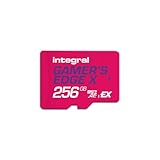
| Integral 256GB Gamer’s Edge X | Lowest entry price for Switch 2 expansion | $49.95 |
How We Picked
We filtered every card by three criteria that actually affect your experience on the Switch 2. First, confirmed microSD Express compliance and NVMe protocol support, because anything that falls back to UHS-I will bottleneck the console. Second, published sequential read and write speeds compared against the Switch 2’s internal storage throughput, since a card slower than the internal NAND will make load times worse rather than better. Third, the relationship between capacity and per-gigabyte price, because paying double per gig for a brand sticker is a decision most owners regret once they hit their first digital purchase.
The 8 Best Switch 2 Sd Card in 2026
Samsung 256GB microSD Express
For players who mostly buy physical cartridges and only need room for updates, indie titles, and a couple of large downloads, this card delivers the most balanced package under $60. Samsung’s controller is proven in consumer hardware and owners report consistent transfer rates without the thermal throttling complaints that plague cheaper rivals.
- Pro: Samsung’s NVMe controller sustains write speeds that match the Switch 2’s internal storage, so installed-game performance does not degrade.
- Pro: The lowest per-gigabyte price of any 256GB option in this roundup.
- Con: 256GB fills up quickly if you prefer digital editions of major releases.
Skip this if you routinely keep more than three or four large titles installed; the capacity ceiling will force constant management.
SANDISK 512GB microSD Express
Owners who want to build a digital library without worrying about running out of room will find 512GB is the sweet spot between price and headroom. This is the plain 512GB variant, not the Switch 2-branded edition, and it costs meaningfully less while offering identical controller hardware.
- Pro: Twice the capacity of the Samsung at a price that still lands under $130.
- Pro: SANDISK’s long warranty and replacement program reduce the risk of a dead card costing you a full library.
- Con: Published write speeds trail behind the Lexar and Integral options, which could matter if you frequently transfer large files to the card.
Skip this if you already own the Switch 2-branded SANDISK and see no price difference; the plain version is the smarter buy in most cases.
SUNEAST 1TB microSD Express
The only 1TB card priced under $280, this option targets owners who refuse to manage storage at all. SUNEAST is a lesser-known brand, and that is the trade-off: you save over $70 versus the SANDISK equivalent but accept a shorter track record for reliability claims.
- Pro: Lowest cost per gigabyte of any 1TB card in this list.
- Pro: Advertised compatibility specifically with the Switch 2’s PCIe interface.
- Con: Limited owner feedback compared to established brands, so long-term durability is harder to verify.
Skip this if brand trust and warranty support matter more than saving $80 over the SANDISK 1TB.
SANDISK 512GB for Nintendo Switch 2
Same capacity as the plain SANDISK above, but carries official Nintendo Switch 2 branding and typically a higher price tag. Buyers choose this for the assurance of a co-optimized product and the bundled download code that some retailers include.
- Pro: Officially licensed and validated specifically for the Switch 2’s storage controller.
- Pro: Often sold with a digital game code or extended warranty at retail, offsetting the price premium.
- Con: Costs $70 more than the functionally identical plain 512GB SANDISK.
Skip this unless a retailer is offering it at or below $129.99; otherwise you are paying purely for packaging.
SANDISK 1TB microSD Express
The premium end of this roundup. For owners who install every new release digitally and never want to delete a game, 1TB from SANDISK provides the most confidence in sustained performance and support.
- Pro: SANDISK’s established controller ensures write speeds remain above the Switch 2’s internal storage baseline even under sustained loads.
- Pro: Full 5-year warranty with a straightforward replacement process.
- Con: At $359.99 it is the most expensive card here, and the per-gigabyte cost is nearly 30% higher than the SUNEAST alternative.
Skip this if budget is a hard constraint; the SUNEAST delivers comparable capacity at a meaningfully lower price.
GIGASTONE 1TB microSD Express
Marketed toward photographers and drone pilots who also game on the Switch 2, this card advertises read and write speeds of 800 and 650 MB/s respectively, plus SD 2.0 through 7.1 compatibility. The bundled 5-year free data recovery service is a genuine differentiator for anyone storing irreplaceable media.
- Pro: The data recovery service adds peace of mind that no other card in this list offers at this tier.
- Pro: Multi-protocol support (UHS-I, UHS-II, PCIe) means one card works across camera, drone, and Switch 2.
- Con: Published speeds, while respectable, trail the Lexar 900 MB/s read figure by a noticeable margin.
Skip this if the Switch 2 is your only use case; the multi-device premium does not justify the cost over the SANDISK or SUNEAST options.
Lexar 512GB Play PRO
At 900 MB/s published read speed, this is the fastest card in the 512GB tier. Owners report noticeably shorter load times in large open-world titles compared to slower microSD Express cards, making it the performance pick without stepping up to 1TB.
- Pro: Highest published read speed of any card under $140.
- Pro: A2 app performance class ensures installed apps launch quickly, not just that bulk transfers finish fast.
- Con: Slightly higher price than the plain SANDISK 512GB for the same capacity.
Skip this if you mostly play smaller or older titles where the speed advantage is imperceptible.
Integral 256GB Gamer’s Edge X
The absolute floor for microSD Express on the Switch 2. Priced at $49.95, it is the cheapest path to adding expansion storage at all. Published speeds of up to 890 MB/s read and 750 MB/s write are competitive with cards costing two to three times as much.
- Pro: Lowest price of any card in this roundup while still delivering NVMe PCIe speeds.
- Pro: Write speed of 750 MB/s is higher than several more expensive cards.
- Con: Integral is a niche brand with limited retail presence in North America, so replacement and support may be slower.
Skip this if you want a widely recognized brand or if 256GB is not enough headroom for your library.
Buying Guide
microSD Express Compliance Is Non-Negotiable
The Switch 2 requires a card that supports the NVMe-over-PCIe protocol bundled into the microSD Express specification. Older UHS-I cards—even fast ones—will not be recognized by the console. Before comparing speeds or prices, confirm the packaging or listing explicitly states “microSD Express.” Every card in this roundup meets that requirement, but the market is full of non-compliant cards sold to confused buyers.
Sustained Write Speeds Matter More Than Peak Read Numbers
Manufacturers advertise peak sequential read speeds because they are the largest number. What actually affects your daily experience is sustained write throughput: how fast the card writes large files during game installations, updates, and save transfers. Look for published write figures and, where available, owner-reported sustained performance. A card that claims 900 MB/s read but writes at 400 MB/s will bottleneck during installs even though load times look great.
Capacity Should Match Your Purchase Pattern
If you buy physical cartridges, 256GB handles updates, saves, and a few digital extras comfortably. If you buy digital editions of games that run 40GB or more, plan on 512GB as a realistic minimum and 1TB if you want to keep a deep library installed without deletion management.
Our Verdict
The Lexar 512GB Play PRO is the top pick for most buyers: it balances high published read speed, A2 app performance class, and a price that stays under $140. The Integral 256GB Gamer’s Edge X is the budget pick at $49.95, delivering competitive speeds at the lowest entry cost. If your priority is absolute maximum capacity for a fully digital library and you trust established brands, the SANDISK 1TB wins despite its price, because the combination of warranty support, proven controllers, and no-brainer capacity removes every friction point short of buying a second console.
FAQ
Will any microSD card work in the Switch 2?
No. The Switch 2 requires microSD Express cards that communicate over NVMe PCIe. Standard UHS-I microSD cards, even high-endurance or “Game” branded ones, are not compatible and will not be recognized by the system.
Do I lose save data if my microSD card fails?
Save data on the Switch 2 is stored in system memory by default, not on the SD card, so a card failure does not erase your progress. Downloaded games, updates, and captures stored on the card will need to be re-downloaded, which is why warranty and brand support matter.
Is a faster card worth it for shorter load times?
Only to a point. Once a card’s read speed matches the Switch 2’s internal storage throughput, additional speed on the card provides no further benefit during gameplay. Where faster cards do help is in bulk file transfers to the card from a PC and in large game installations.
Can I use the same card in a camera or phone?
Most microSD Express cards are backward compatible with UHS-I devices, though they will operate at the lower UHS-I speed rather than the PCIe speed. Check the listing for UHS-I or UHS-II class ratings if multi-device use matters to you; the GIGASTONE explicitly advertises this compatibility.










Write Your Review
No reviews yet. Be the first to share your experience!